Should you run customer live chat through Slack?
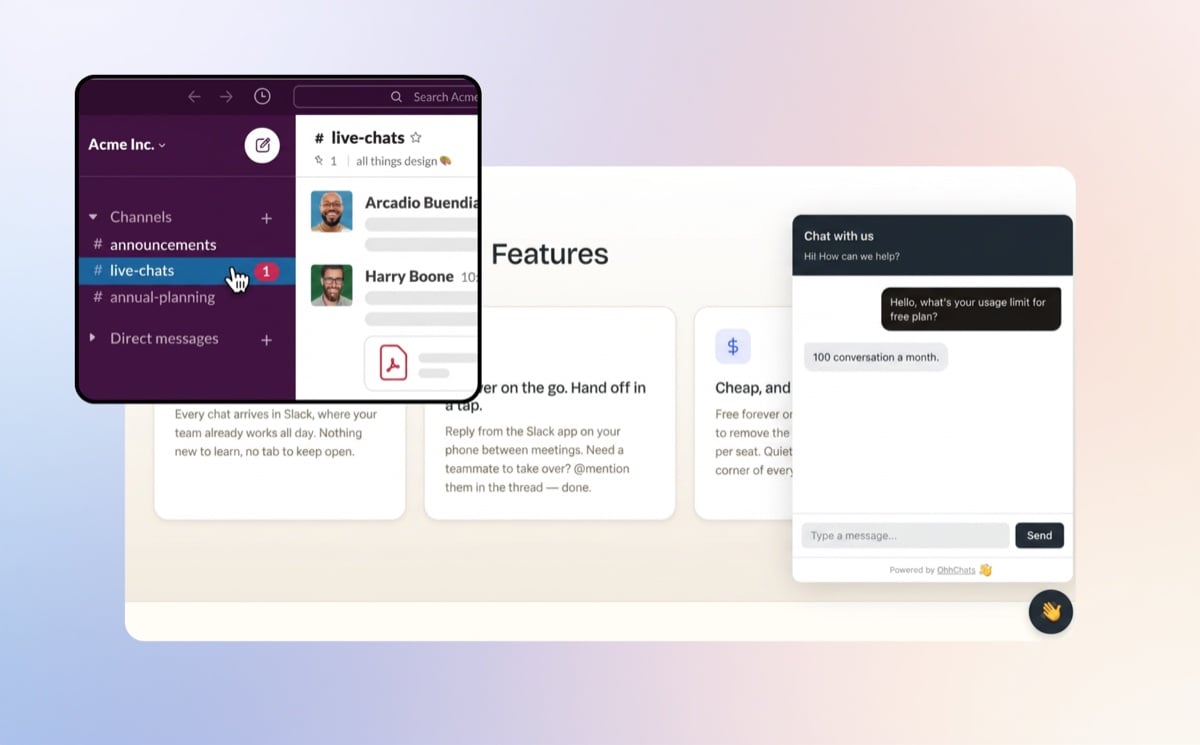
For solo founders and small teams who already live in Slack, running customer live chat through Slack is often the simplest and cheapest setup you can have — you reply to website visitors from the place you already work, with no extra inbox to babysit. It's a poor fit if you're a high-volume support team that needs full ticketing. Here's how to tell which one you are.
I'll be honest throughout this, including the parts where Slack isn't the right answer. I build a Slack live chat tool, so I have a horse in this race — but a guide that pretends Slack is always the answer isn't worth your time, and you'd see through it anyway.
What "live chat through Slack" actually means
The setup is simple: a visitor types a message into the little chat widget on your website, that message lands in a Slack channel, you reply from inside Slack, and your reply pops back up in the widget on your site. The visitor never knows you're in Slack — to them it's just a normal website chat.
There's one distinction worth getting straight before anything else, because it changes everything:
- Slack-native chat means you do the whole conversation inside Slack. The message arrives in a channel, you reply in the thread, done. You never open another app.
- A standalone chat tool that notifies Slack is a separate product with its own dashboard that happens to ping Slack when a new chat comes in — but to actually reply, you log into that other tool.
Those sound similar and aren't. The first means Slack is your chat inbox. The second means you've added a notification to a tool you still have to go and use. When people talk about the appeal of "live chat in Slack," they almost always mean the first one. This guide is about that.
When running live chat through Slack works well
You already live in Slack all day. This is the whole thing, really. If your team is already in Slack from morning to evening, a customer chat landing in a channel isn't a new place to check — it's just another message in the app you never close. Nothing new to learn, no extra tab open "just in case."
You're solo or a small team. When a chat comes in and you're heads-down, anyone can jump into the thread and take it. Need a teammate to handle one? @mention them — they're already there. No seats to assign, no "who's on chat duty" rota.
You want to answer from your phone. Slack's mobile app is already on your phone and you already get its notifications. So replying to a customer from the queue at lunch, or between two meetings, costs you nothing extra — it's the same as answering any other Slack message. Compare that to remembering to keep a separate chat dashboard open on a device you're not at.
It's cheap. A full customer support suite is built (and priced) for support teams. If you're one person or a handful, you'd be paying for routing, SLAs, and reporting you'll never switch on. Slack-native chat tools tend to be a fraction of the cost because they do one job.
It's fast to set up and forget. Drop a widget on your site, connect your Slack, pick a channel. There's no system to learn, no agent training, no migration. For someone who'd rather spend the afternoon on their actual business, that matters.
The honest summary of the "yes" case: if you're already in Slack and you don't have a support team, running chat through Slack removes a whole tool from your life instead of adding one. That's the appeal.
When it doesn't work (be honest with yourself here)
This is the part most tool-makers skip. Slack-based live chat is genuinely the wrong choice in a few situations, and if you're in one of them, you'll be happier paying for a dedicated tool.
You have high, steady chat volume. A Slack channel is a stream of messages, not a queue. If you're fielding dozens of simultaneous chats all day, you'll want real queueing, assignment, and "this one's being handled" status — and a channel starts to feel chaotic. A dedicated help desk is built for exactly that load.
You need real ticketing. If your work depends on conversation statuses, SLAs, assignment rules, tags, and proper reporting on response times, that's a ticketing system, and Slack isn't one. Don't try to bend it into one.
You're a larger support team with shifts. Handoffs between shifts, audit trails, performance reporting per agent — that's dedicated-tool territory. Slack can do team chat beautifully, but it won't give you the structure a real support org needs.
You need an AI chatbot or WhatsApp/SMS as a core requirement. If answering chats automatically after hours, or handling WhatsApp and SMS in one place, is essential to how you operate today — not a someday nice-to-have — then a broader platform that bundles those will serve you better than a focused Slack chat tool.
If any of those is you, a dedicated live chat or help desk tool is the better call — and that's completely fine. Pick the tool that fits the job.
Slack chat vs a dedicated chat tool, at a glance
| Live chat through Slack | Dedicated chat / help desk | |
|---|---|---|
| Where you reply | Inside Slack (no new app) | A separate dashboard |
| Setup effort | Minutes — widget + connect Slack | More involved; agent setup |
| Cost | Low — does one job | Higher — built for teams |
| Ticketing / SLAs / reporting | Minimal | Full |
| Best team size | Solo to small team | Mid-size to large support teams |
| Learning curve | None if you know Slack | Real onboarding |
| Volume it suits | Low to moderate | High, steady |
Neither column is "better." They're built for different sizes of problem.
How to actually set it up
Whatever tool you choose, running customer chat through Slack comes down to three pieces:
- A chat widget on your website — the little "Chat with us" box visitors type into.
- A connected Slack workspace — so messages can flow into Slack and your replies can flow back out.
- A Slack channel for incoming chats — somewhere the messages land, like
#live-chats, so they're not buried in your general channels.
That's the entire architecture. A visitor's message hits the widget, arrives in your channel, you reply in the thread, the reply shows up in the widget. Once it's connected, there's nothing to manage day to day — you just answer messages in Slack like you already do.
If you've decided Slack chat is for you
If you've read the "when it doesn't work" section and you're still here — you're in Slack, you're solo or a small team, you want something simple and cheap — then this is exactly the setup I built OhhChats for.
OhhChats is a Slack-native live chat widget. Chat lands in your Slack, you reply from your Slack, and that's the whole product — no second dashboard. It's free to start, then $15/month per site, with your whole team included and no per-agent fees. I built it for the solo founder and the small studio, not the enterprise support floor, which is why it does this one thing and doesn't try to sell you ticketing you won't use.
To be straight about the tradeoff: OhhChats doesn't (yet) bundle an AI chatbot or handle WhatsApp and SMS. If those are must-haves for you today, a broader platform is the honest recommendation. If you just want website chat in your Slack without the cost or the complexity, that's the gap it's built to fill.
If you're weighing the options, it's worth comparing the Slack-native tools side by side rather than taking my word for it — see our roundup of the best Slack live chat tools for solopreneurs and freelancers, which covers the real alternatives too. You can also estimate what you'd pay and save with our pricing calculator.
FAQ
Can you do customer support entirely from Slack?
Yes, if your volume is low to moderate and you don't need formal ticketing. With a Slack-native chat tool, every website conversation arrives and is answered inside Slack, so for a solo founder or small team it can be your entire support setup.
Do you need a paid Slack plan to run live chat through Slack?
No. Slack-native chat tools work with your existing Slack workspace, including free Slack plans. You don't need to upgrade Slack to use them.
Is running chat through Slack secure and professional enough for customers?
Yes — the customer only ever sees a normal chat widget on your website. Where you reply from (Slack) is invisible to them, so the experience looks the same as any other live chat.
What's the difference between Slack-native chat and a tool that just notifies Slack?
With Slack-native chat you reply inside Slack and never leave it. A tool that only notifies Slack pings you when a chat arrives, but you still have to open its separate dashboard to respond.
Is Slack live chat cheaper than a dedicated live chat tool?
Usually, yes. Slack-native tools do one focused job and skip the team-scale features (routing, SLAs, advanced reporting) that make full help desks expensive, so they tend to cost noticeably less.
The bottom line
Run your customer live chat through Slack if you already live in Slack, you're solo or a small team, and you want a simple, low-cost setup with nothing new to learn. Don't, if you're a high-volume or larger support team that needs real ticketing, routing, and reporting — that's a job for a dedicated help desk.
For a lot of founders and freelancers, though, the honest answer is: you're already in Slack all day, so the simplest place to answer your customers is the place you're already sitting. If that's you, here are the best Slack live chat tools to start with.